When you upload a spreadsheet that is not an IRISfile template, such as a Yardi or RealPage export, IRISfile holds it under Needs fixing with a Map columns action. Click Map columns on the file's row and answer the questions under To answer. Click Convert when none are left. The file then converts like any other and splits by payer when it holds more than one payer TIN.
Key facts
- Applies to
- CSV or Excel files that match no IRISfile or IRS Portal template
- Forms and years
- 1099-NEC, MISC, INT and DIV; tax years 2025 and 2026
- While waiting
- Under Needs fixing, with a Map columns action
- Nothing is filed
- Mapping converts the file only
- Waiting files
- Up to 20 at once; one left unmapped for 30 days is removed
- Cost
- Free, like any conversion
Before you start
- The export
- A CSV or Excel file from your software. Most exports need no reformatting.
- Missing payer details
- The TIN of each payer, and any other payer detail the export does not list.
Step by step
Upload the export
Upload the file the same way as any other: click Upload files and drop it in. If the columns match no template, IRISfile does not report errors. It says the file's columns need mapping and shows a Map columns link.

The upload panel says the file's columns need mapping, with a Map columns link. Open full size Find the file under Files
The file waits on the Files page under Needs fixing. Its row says the columns need mapping. Click Map columns on the row to come back to it at any time.
IRISfile keeps up to 20 files in this state. It removes a file that stays unmapped for 30 days.

Under Files, the file waits under Needs fixing with a Map columns action. Open full size Read the mapping page
The page title is Map columns, followed by the file name. IRISfile has already guessed which column feeds each field. Your sheet shows the first 60 rows of the file, with TINs masked to their last four digits. 1099 records shows the first 60 records the sheet becomes.
Hover a record to light its source row and column in Your sheet. This works only for rows shown in the preview.
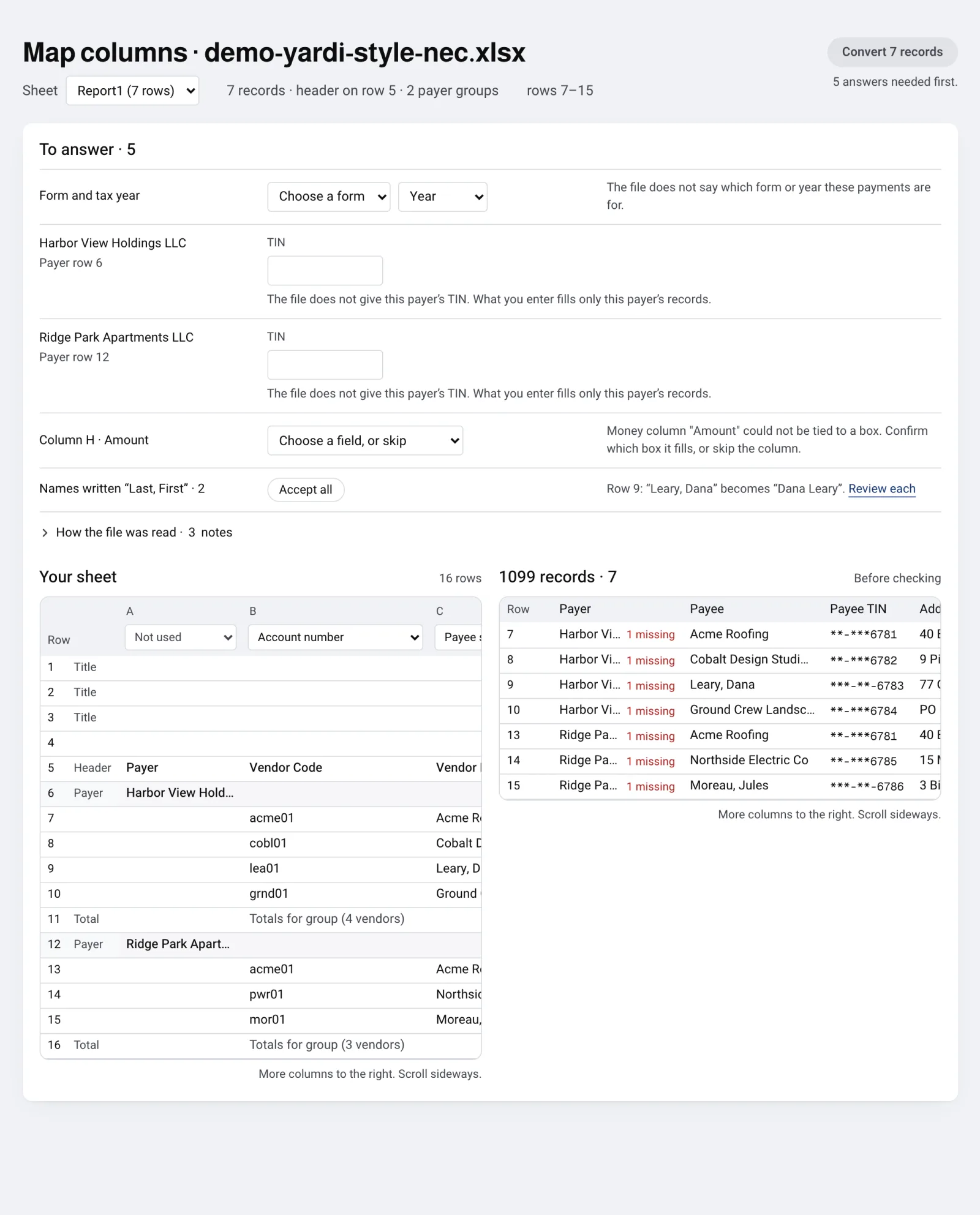
The mapping page: the questions under To answer, then your sheet beside the records it becomes. Open full size Pick the sheet that holds the returns
An Excel workbook with more than one sheet shows a Sheet menu above the tables. It opens on the first sheet.
Choose the sheet that holds the returns. Convert reads only that sheet. To convert another sheet, upload the file again and choose that sheet.
Answer what the file leaves out
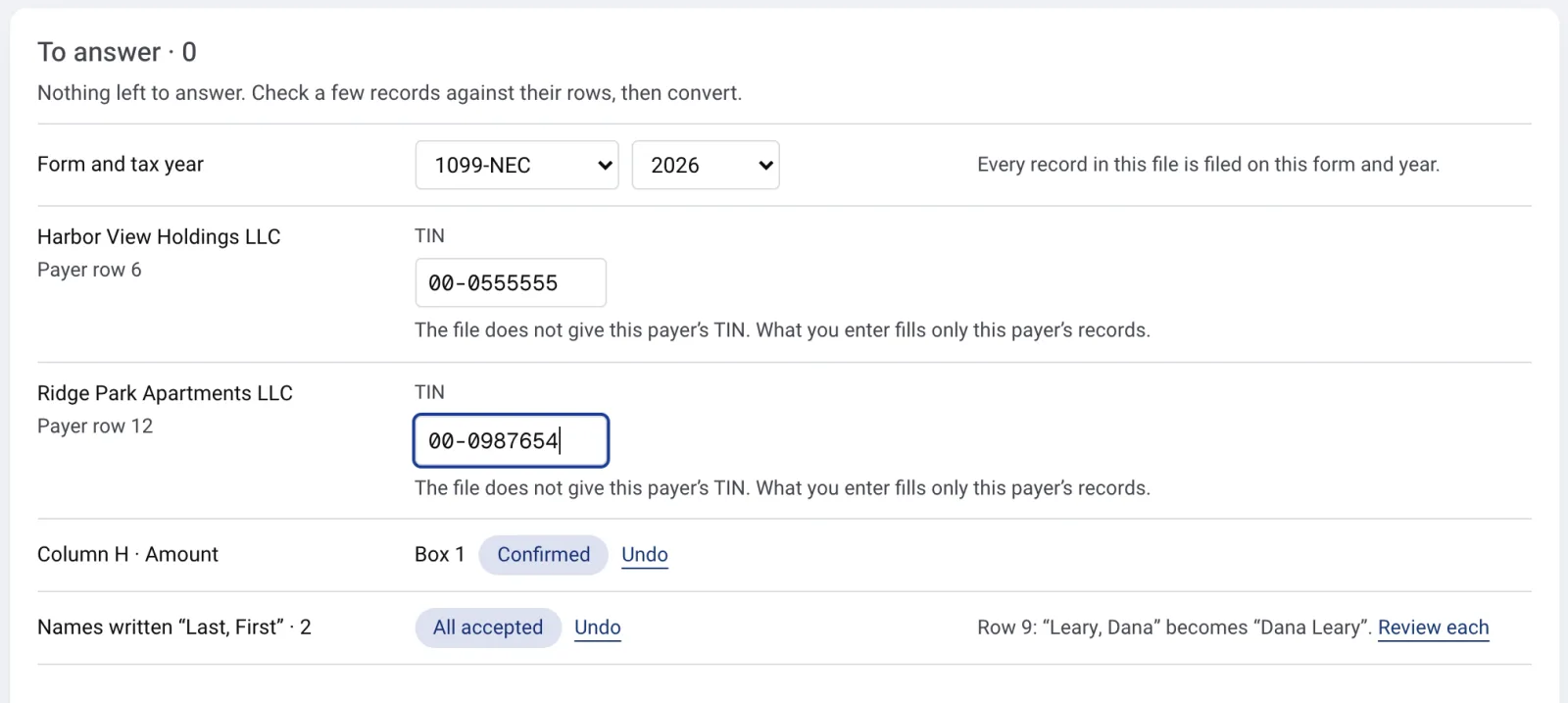
The To answer panel lists only what IRISfile cannot work out. The count next to the heading drops as you answer.
Form and tax year: choose the form and year. They apply to every record on the sheet. If a column in the file names a different form or year, skip that column or change your choice.
Payer details: when a payer group row lacks the TIN, name, street, city, state or ZIP, enter it. It fills only that payer's records. When a group row holds more than one name, enter the payer's legal name.
An amount column: choose the box it fills. When IRISfile suggests a box, click Confirm, or pick another box over that column in Your sheet.
Other notices: a Before converting line appears when no column is set to the payee TIN, the payee name or an amount. Two columns set to one field also block Convert. Set or skip the column.
Names written “Last, First”: this step is optional and does not count as unanswered. Click Accept all to flip them, or Review each to check row by row. Accept a flip only for a person's name, not a business. Unchecked names stay as written.
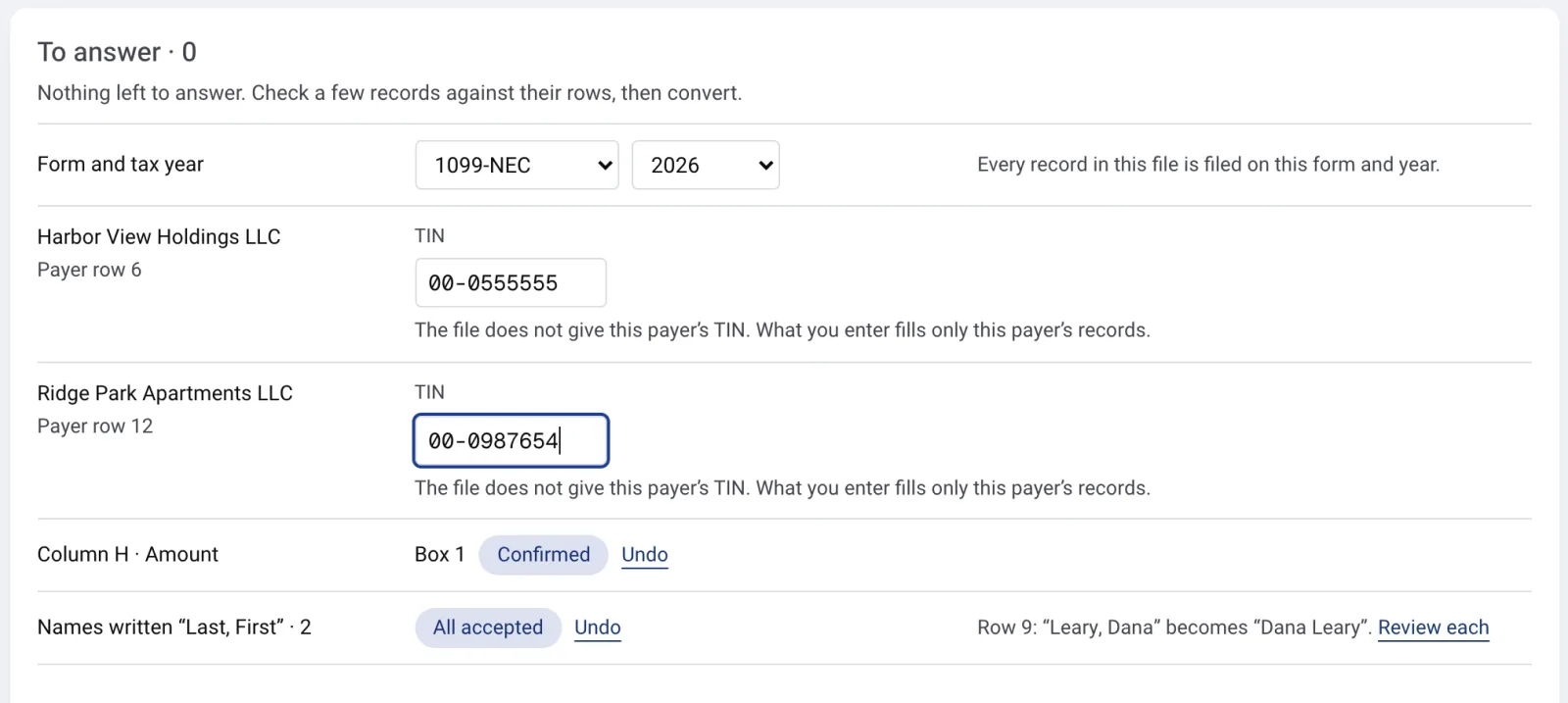
Answer what the file leaves out: the form and year, a TIN for each payer, the box for the amount column, and the name flips. Open full size Convert the records
When nothing is left to answer, the line under the button reads Ready to convert. Click the button, which reads Convert N records, or Convert 1 record for a single record.
Until then the line says how many answers are still needed. If Convert reports a problem, a box at the top of the page lists what to fix.

When nothing is left to answer, Convert N records turns on. Open full size Check the split files
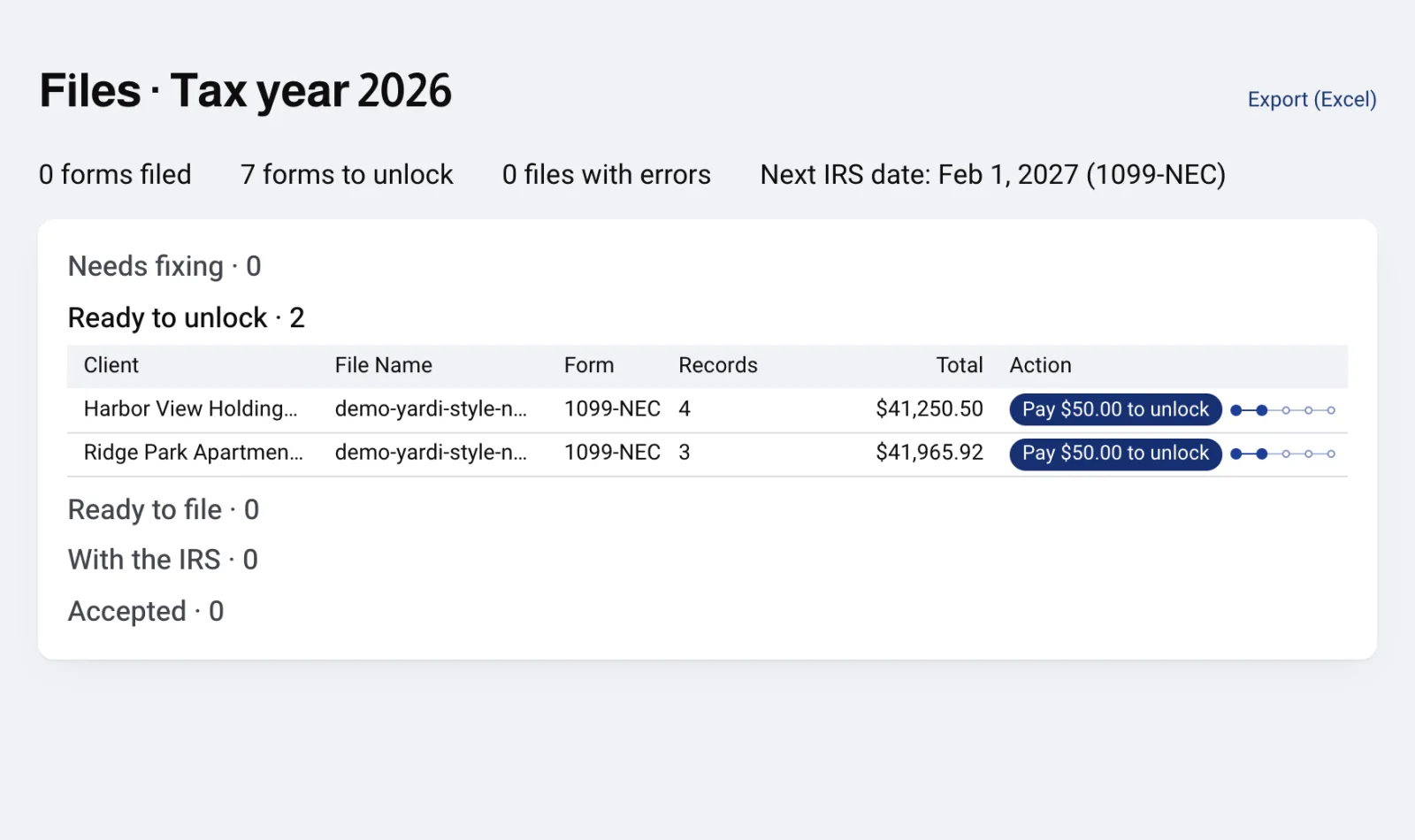
After Convert, the file runs the normal conversion and checks every record. When the file parses clean and holds more than one payer TIN, it splits so each client's returns stay separate. Each file lands under its stage on the Files page.
If a record fails a check, see Fix validation errors.
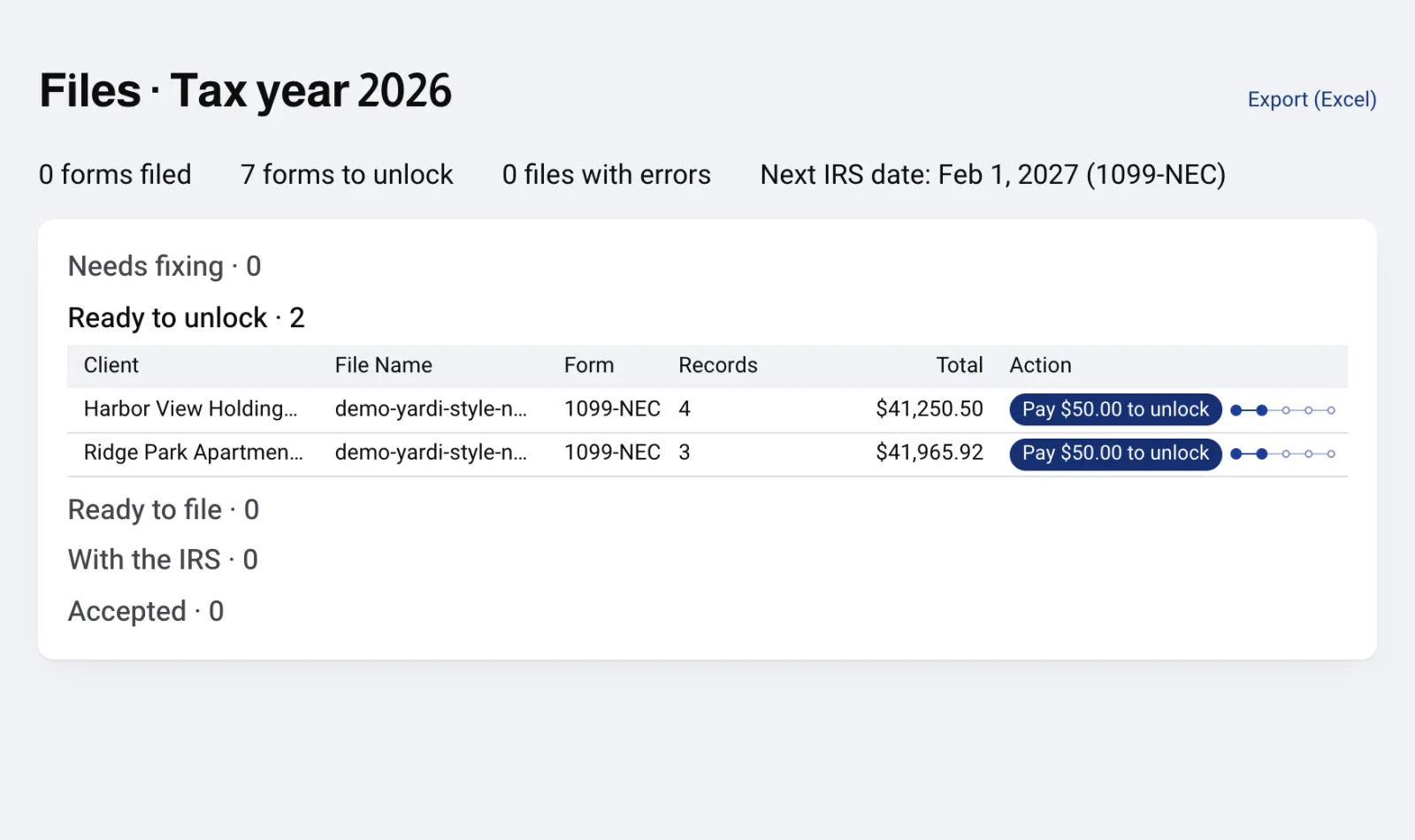
After Convert, the file runs the normal conversion and splits into one file per payer. Open full size



If something goes wrong
- We could not read this file.
- The mapping page could not load the file. The cause can be an expired session, a network or server error, a busy preview, a file over the upload limit or a file that is not a readable spreadsheet. Click Try again. If it keeps failing, email support@irisfile.co with the file name.
- This file is already mapped. It is on your Files page.
- The file is no longer waiting for mapping. Someone converted it, or it expired after 30 days unmapped. Go back to Files. A converted file is there. For an expired file, upload it again.
- This file is not in your account.
- The file does not belong to the account you are signed in to, or its stored copy is gone. Sign in to the right account, or upload the file again.
- Too many files are waiting for column mapping; map or delete one first
- Your account already has 20 files waiting. Map or delete one under Needs fixing, then upload this file again.
- Not ready to convert yet.
- At least one answer is still open. Read the To answer panel and the Before converting notes, then answer each one.
- Your last change was not applied. Change it again to retry.
- The page could not re-read the file after your change. This happens when the preview is busy or the connection drops. Change the field again.
- The file did not convert.
- Try again. If it keeps failing, email support@irisfile.co.
Questions
- Which exports does this work for?
- CSV or Excel exports whose columns match no IRISfile or IRS Portal template, such as Yardi and RealPage exports. IRISfile reads the header row and the payer group rows, then asks about anything it cannot tell. You can map 1099-NEC, MISC, INT and DIV for tax years 2025 and 2026.
- Does mapping send anything to the IRS?
- No. Mapping and converting only prepare the records. Filing is the separate File with the IRS step.
- Do I have to fix the spreadsheet first?
- Usually not. Upload it as it comes out of your software and answer the questions on the mapping page. The limits in the next question are the exceptions.
- What are the limits on a mapped file?
- The file must be under 50 MB. IRISfile reads up to 256 columns and drops the rest with a note. It cuts any cell over 1,024 characters. It asks for payer details for up to 200 payer groups. Past that, payer values must come from columns in the file.
- Does mapping cost anything?
- No. Uploading, mapping, converting and validating are free. You pay per form when you download outputs or file. Each checkout has a $50 minimum.