Fix validation errors
When a 1099 record fails validation, IRISfile lists each error with the record number and the field that failed. It builds no XML, Portal CSV, or recipient copies for that file until every error is fixed. Correct the records in your source file and upload it again.
All help articlesLast reviewed October 2026
Steps
1. Read the error list
Each error names the record, the field in brackets, and what is wrong with it. Record 2 is the second record IRISfile read from your file.
A four-digit ZIP usually means a spreadsheet dropped a leading zero. Format the ZIP column as text in Excel, then type the zero back.

Three errors, each naming the record and the field. 2. Know why there are no downloads
IRISfile never builds a partial file. One bad record holds back the output for the whole file, so a wrong return can't reach the IRS by accident.

Output is withheld until every error is fixed. 3. Find the failing rows
The record table marks each failing row with ERROR, next to the values IRISfile read. Use it to check what came through from your file.
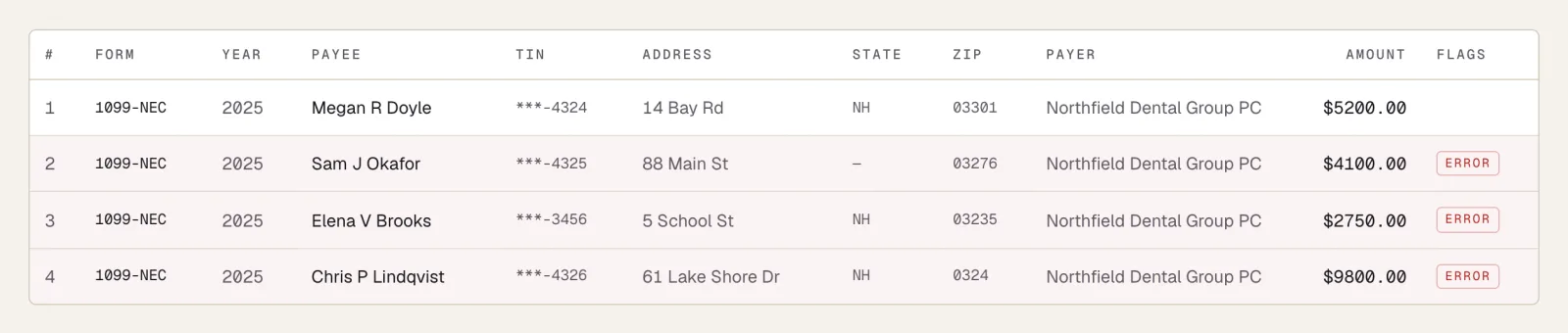
Failing rows are marked ERROR in the record table. 4. Download the error report for the season
Error report (CSV) lists every error across all your files in one spreadsheet. Use it to work through several clients at once. The link shows only while at least one file has errors.

Error report (CSV) lists every error across the season. 5. Fix the source file and upload it again
Correct the records in your spreadsheet or FIRE file, save it, and drop it on the dashboard again. When every record passes, the download buttons appear.
Delete the old row from IRS Files with its trash icon if you no longer need it.

After the fixes, the file converts and the downloads appear.
Questions
- Why does one bad record block the whole file?
- IRISfile builds output only when every record passes. A failing record could produce a return the IRS rejects or one that reports the wrong amount, so the whole file waits until the error is fixed.
- Why does my ZIP code show four digits?
- Excel treats a ZIP code as a number and drops its leading zero. Format the ZIP column as text, type the zero back, and save the file again.
- How do I see the errors for all my clients at once?
- Click Error report (CSV) under Season at a glance on the dashboard. It lists every error across all your files in one spreadsheet. The link shows only while at least one file has errors.
Try it on a file you already have.
Get notified