Click API keys in the dashboard top bar, type a name and choose Live or Sandbox. Live is the default and works with the MCP server at https://irisfile.co/mcp. Sandbox keys are for the IRISfile API private beta and never file a live return. Click Create key, then Copy: IRISfile shows the key only once. To stop it working, click Revoke, then Confirm revoke. For filing events, click Add endpoint under Webhooks and copy the signing secret: it also shows once.
Key facts
- Where
- API keys in the dashboard top bar
- Shown
- Once, when you create the key
- Active keys
- Up to 10 per account
- Reach
- Every file in your account
- Kinds
- Live (irf_live_, the default) or Sandbox (irf_test_)
- Endpoint
- https://irisfile.co/mcp, live keys only
- Webhooks
- Up to 5 endpoints per environment, secret shown once
Before you start
- Account
- An IRISfile account you can sign in to.
- Client
- Claude, Cursor or another MCP client, or your own code that calls the IRISfile API.
- Webhook URL
- An https URL on the default port whose host is a public host name or a public IP address.
Step by step
Open API keys and create a key
Sign in and click API keys in the top bar. The page says what a key can reach and lists your keys.
Type a name in Key name, such as the client the key is for. Choose Live for MCP or Sandbox for the API private beta, then click Create key. A name can be up to 60 characters.

The API keys page with a key name typed and Create key outlined. Open full size Copy the key
IRISfile shows the new key under the form. Click Copy, then paste the key into your AI client.
IRISfile stores only a fingerprint of the key, so it can't show the key again. Click Done when you have it. If you lose a key, create a new one and revoke the old one.

The new key, shown once, with Copy outlined. Its middle is hidden for this screenshot. Open full size Add the key to your client
The client sends the key with every call, as an Authorization: Bearer header or an x-api-key header. An AI client calls https://irisfile.co/mcp with a live key.
In Claude Code, run claude mcp add with the endpoint and the header. In Claude or Cursor, add the endpoint and the header in the client's connector settings. The IRISfile MCP server page has the exact setup for each client.
Your own code calls the API at https://irisfile.co/api/v1 with a sandbox key. The API docs have a quick start that files two test records with the IRS sandbox.
Check when a key was last used
Your keys table lists each key's name, the first characters of the key, its kind, the date it was created and the date it was last used. A key that has never connected reads Never.
Use Last used to find a key that nothing uses any more, then revoke it.

The new key under Your keys: Active, never used, with Revoke outlined. Open full size Revoke a key
Click Revoke on the key's row. The button changes to Confirm revoke for 4 seconds; click it again to revoke the key.
The key's status changes to Revoked with the date. The key fails on its next call, and the row stays in the list as a record.

After Confirm revoke the key reads Revoked with the date, and its Revoke button is gone. Open full size Add a webhook endpoint and copy its secret
Under Webhooks on the same page, type your https URL in Endpoint URL. In Files, choose Sandbox for events about sandbox files or Live for live files, then click Add endpoint.
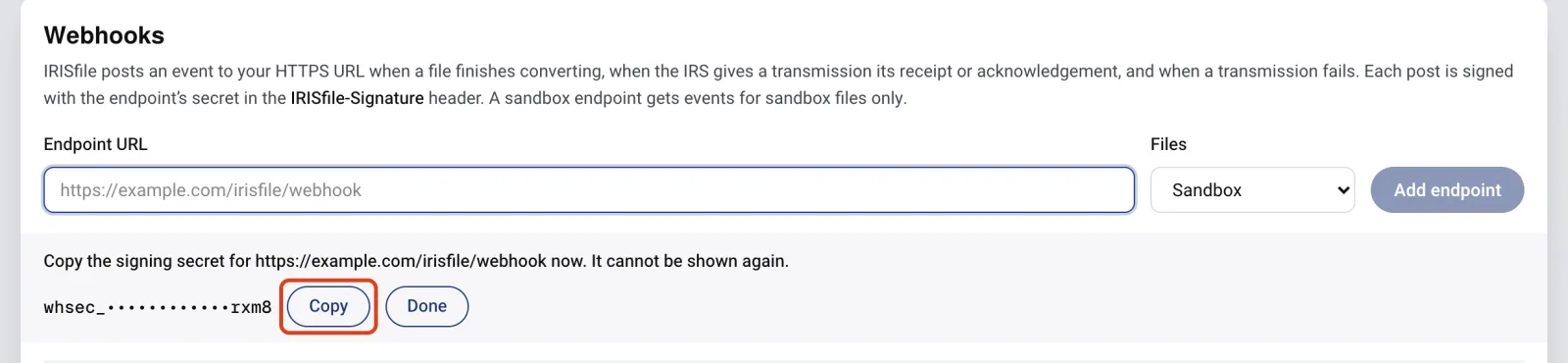
IRISfile shows the endpoint's signing secret once. It starts with whsec_. Click Copy, store the secret with your server's other secrets, then click Done. If you lose it, delete the endpoint and add it again.
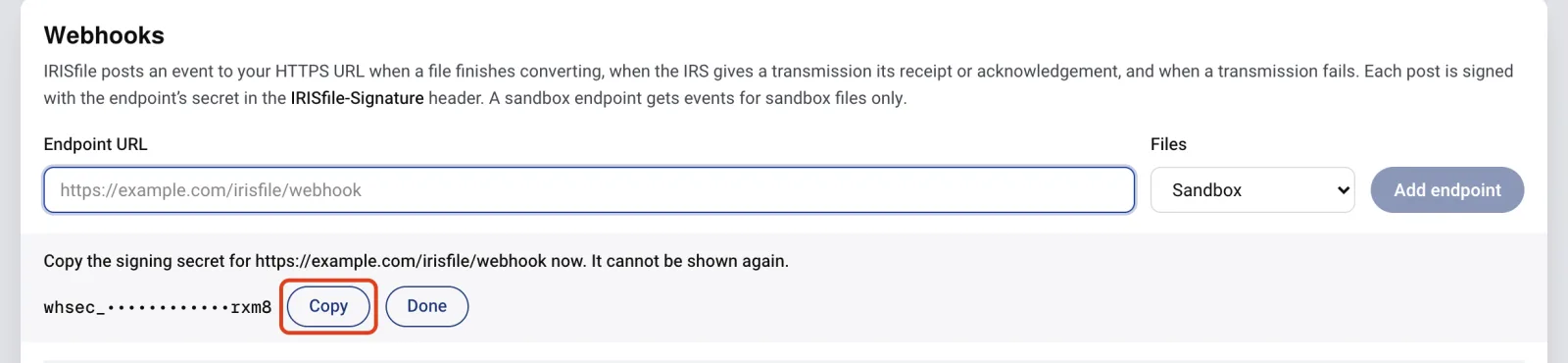
The new endpoint's signing secret, shown once, with Copy outlined. Its middle is hidden for this screenshot. Open full size Send a test event and check the signature
Click Send test on the endpoint's row, and the button reads Test sent. IRISfile posts a webhook.test event to the URL. Reload the page to see the result under Last delivery: Delivered with the date, Retrying, or Failed after 7 tries.
Each post carries an IRISfile-Signature header: t=<unix seconds>,v1=<signature>. Your server computes an HMAC-SHA256 of the timestamp, a period and the raw body, keyed with the secret, and compares it with v1. Reject a post whose timestamp is more than 300 seconds from your server's clock.
The API docs have a Node.js function that does this check. After the test event works, the endpoint gets an event when a file finishes converting, when the IRS gives a transmission its receipt or acknowledgement, and when a transmission fails.

The endpoint under Webhooks: its URL, Sandbox, the secret's last 4 characters, and Send test outlined. Open full size





If something goes wrong
- The API key has been revoked.
- The client is still sending a key you revoked. Create a new key and replace the old one in the client's settings.
- The API key is not valid.
- The client is sending an invalid key, or a sandbox key to the MCP server. Copy a live key again: it starts with irf_live_. Sandbox keys start with irf_test_. Check that nothing else is in the header.
- An account can hold 10 active keys. Revoke one first.
- Your account already has 10 active keys. Revoke a key you no longer use, then create the new one.
- Rate limit reached: 60 requests per minute per API key.
- The key made more than 60 calls in one minute. Wait for the time in the message, then try again.
- The URL's host resolves to a private or reserved address.
- IRISfile posts only to public addresses. Use the public https URL of your server, not localhost, a private IP or an internal host name.
- An account can hold 5 endpoints per environment. Delete one first.
- The Sandbox or Live list already has 5 endpoints. Click Delete on one you no longer use, then Confirm delete, and add the new one.
Questions
- Can I see a key again after I click Done?
- No. IRISfile keeps only a fingerprint of each key, so nobody can read it back. Create a new key, then revoke the one you lost.
- What can an agent do with my key?
- Through the MCP server, it can list supported forms, check and convert files, and read the status of every file in your account. The MCP tools can't file with the IRS or pay for forms. The same key also works with the IRISfile API: there it can upload and convert files, debit form credits and file transmissions. A live key files with the IRS. A sandbox key files with the IRS test system. Treat a key like a password, and give it only to code and clients you trust.
- Does a key cost anything?
- No. Creating a key and calling the MCP tools are free. Through the API, converting and validating are free. Downloading XML needs a license for the file's tax year and debits nothing. A Portal CSV download and a filing with the IRS debit form credits for forms you have not paid for. A qualifying sandbox file needs no license and no credits.
- How many keys can I have?
- Up to 10 active keys per account. Revoked keys don't count toward the limit, and they stay in the list.
- Why does my webhook endpoint fail when the URL works?
- IRISfile counts only a 2xx answer within 10 seconds as delivered, and a redirect counts as a failure. Answer the post directly with 200 or 204, and check the signature before you act on the event.