IRISfile shows on each file's row how many records owe Massachusetts an annual 1099 report. Open the row's Massachusetts panel to see the due date and any record whose status is unknown. Massachusetts file generation is in pilot. On the Pro plan and above, IRISfile writes a Publication 1220 file for 1099-NEC and MISC originals, tax years 2025 and 2026. You upload that file to MassTaxConnect yourself.
- States checked
- Massachusetts only
- Owed when
- Payee lives in MA or the record has an MA state block
- Unknown when
- Only the payer is in MA, or a state is blank
- File generation
- In pilot, Pro plan and above
- Forms and years
- 1099-NEC, MISC originals, tax years 2025 and 2026
- Upload
- You upload to MassTaxConnect yourself
Step by step
- 01
Find the State column on the file's row
Convert the file first. The State column in IRS Files then shows what the file owes Massachusetts. MA OWED · 3 means three records owe the report.
A record owes Massachusetts when the payee lives in Massachusetts or the record has a Massachusetts state block. MA UNCLEAR means IRISfile can't tell yet. A dash means no record owes Massachusetts.
This column works on every plan.

The State column on the file's row: MA owed, with the number of records. - 02
Open the Massachusetts panel
Click OPEN under the badge. The panel shows how many records owe the report and the electronic due date for each form and tax year.
Unknown is never treated as not owed. Here one record has a Massachusetts payer and a payee outside Massachusetts. If that income is Massachusetts-source, add a Massachusetts state block to the record and convert the file again. A record with a blank payer or payee state is unknown too.
The panel also lists owed records that can't go in the file: other forms, corrections and voids, payees with a foreign address, and other tax years. File those with Massachusetts DOR outside IRISfile.
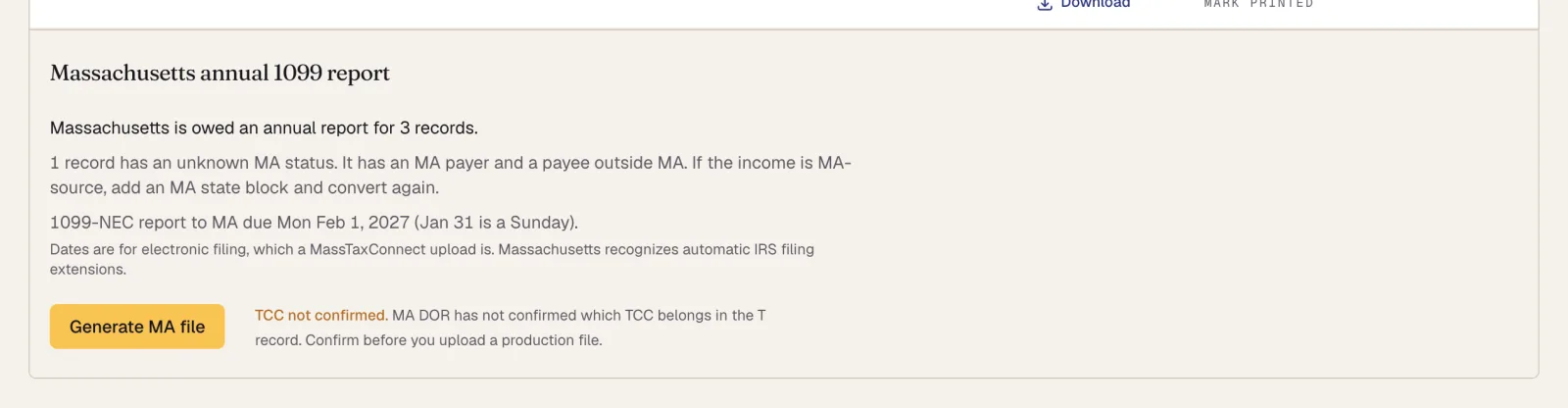
The Massachusetts panel: what is owed, the unknown record, and the due date. - 03
Generate the Massachusetts file
Massachusetts file generation is in pilot. Click Generate MA file. This needs an active Pro plan or above. IRISfile writes a Publication 1220 file for the owed records and lists it as attempt 1, with a Download link.
Left out counts the records that did not go in the file, such as a record with an unknown status or one on another form.
Before you upload a production file, read the TCC note in the panel. Massachusetts DOR has not confirmed which TCC belongs in the file's T record.
The row's badge now reads MA READY. If some owed records are not in the file, it reads MA PARTIAL with their number instead.
Generate a new MA file after you fix records. The earlier attempt is then marked Replaced and keeps its Download link. This screenshot is from our test environment, so the attempt is marked test.

Attempt 1 is ready, with its Download link. - 04
Upload the file to MassTaxConnect
Download the file and upload it to MassTaxConnect yourself. IRISfile does not upload it for you.
Then click Mark uploaded on the attempt. Enter the MassTaxConnect confirmation number if you have one, and click Save.

Mark uploaded takes an optional MassTaxConnect confirmation number. - 05
Check the result in MassTaxConnect
The attempt now reads Uploaded with the date, and the row's badge reads MA UPLOADED. Uploaded only records what you did. IRISfile does not receive Massachusetts DOR's acceptance, so check MassTaxConnect for the result.
Downloading and marking an attempt work on every plan, so a plan change never takes a file away.
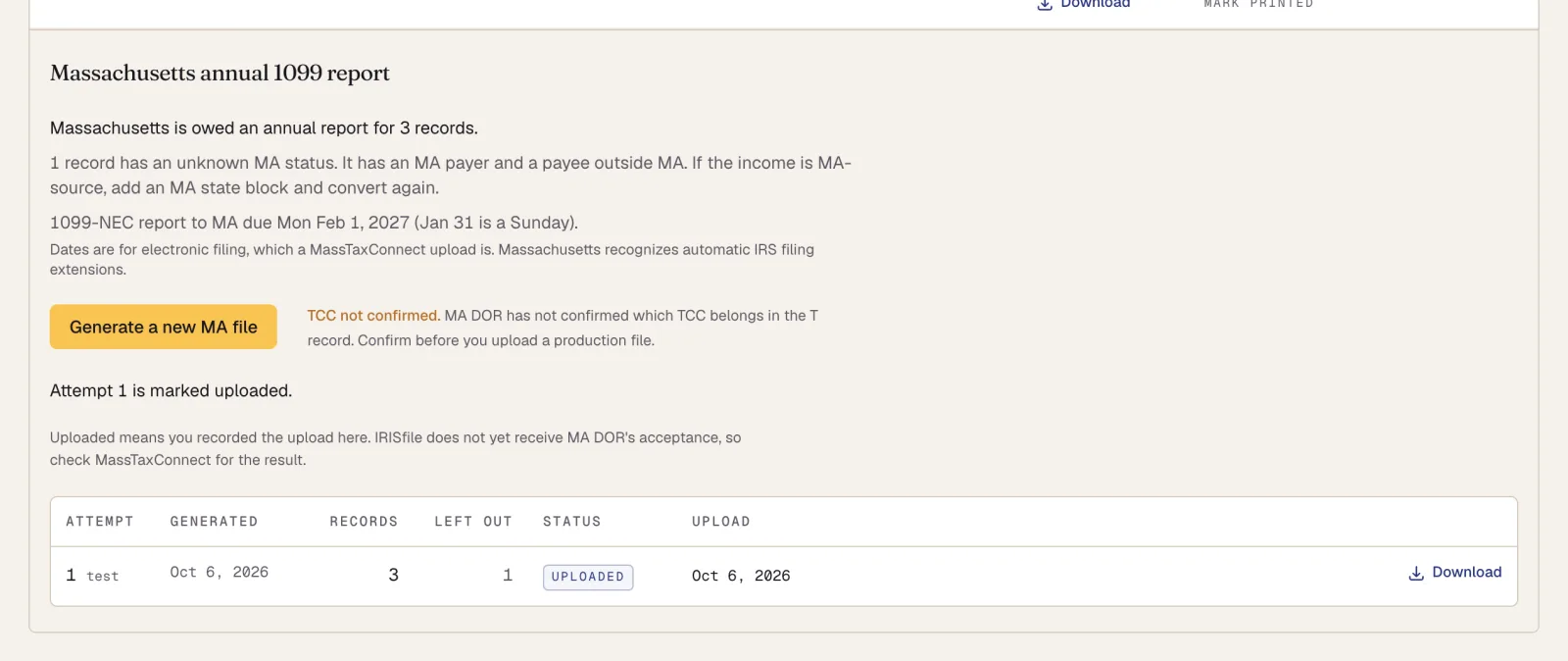
The attempt marked Uploaded, with the note that DOR acceptance is not tracked.
Questions
- Does IRISfile file my 1099s with Massachusetts?
- No. Massachusetts file generation is in pilot. IRISfile writes the file, and you upload it to MassTaxConnect yourself.
- Does the Combined Federal/State Filing Program cover Massachusetts?
- No. Massachusetts requires its annual report even if the transmitter takes part in the Combined Federal/State Filing Program.
- Which other states does IRISfile check?
- None yet. IRISfile checks and generates files for Massachusetts only.