To file 1099s with the IRS in IRISfile, convert the file, then click File with the IRS on its row in IRS Files. Check the summary and click File now. IRISfile sends the IRIS A2A transmission and shows the IRS receipt ID. The acknowledgement follows when the IRS finishes processing.
- Channel
- IRIS A2A
- Recall
- Not possible after File now
- Receipt
- UTID and IRS receipt ID per transmission
- Acknowledgement
- A, E, P, or R
- After a rejection
- Replace within 60 days to keep the received date
- Corrections
- Not filed by IRISfile yet
Before you start
- A converted file
- Its row in IRS Files shows XML READY.
- Production filing
- You confirm that you reviewed the return data before File now turns on.
Step by step
- 01
Open the file's row in IRS Files
Convert the file first. When every record passes, its row in IRS Files shows XML READY and a File with the IRS button.
IRISfile files 1099-NEC, MISC, INT, and DIV originals, and 1099-R when the record carries a box 7 distribution code.

File with the IRS on the file's row in IRS Files. - 02
Check the summary, then click File now
The dialog shows the filer, the last four digits of the EIN, the form, the tax year, and how many records and transmissions go to the IRS.
This screenshot comes from our test environment, so it says Sandbox. In production the box says Production, warns that the IRS receives the transmission and it can't be recalled, and asks you to confirm that you reviewed the return data. File now stays off until you tick that box.
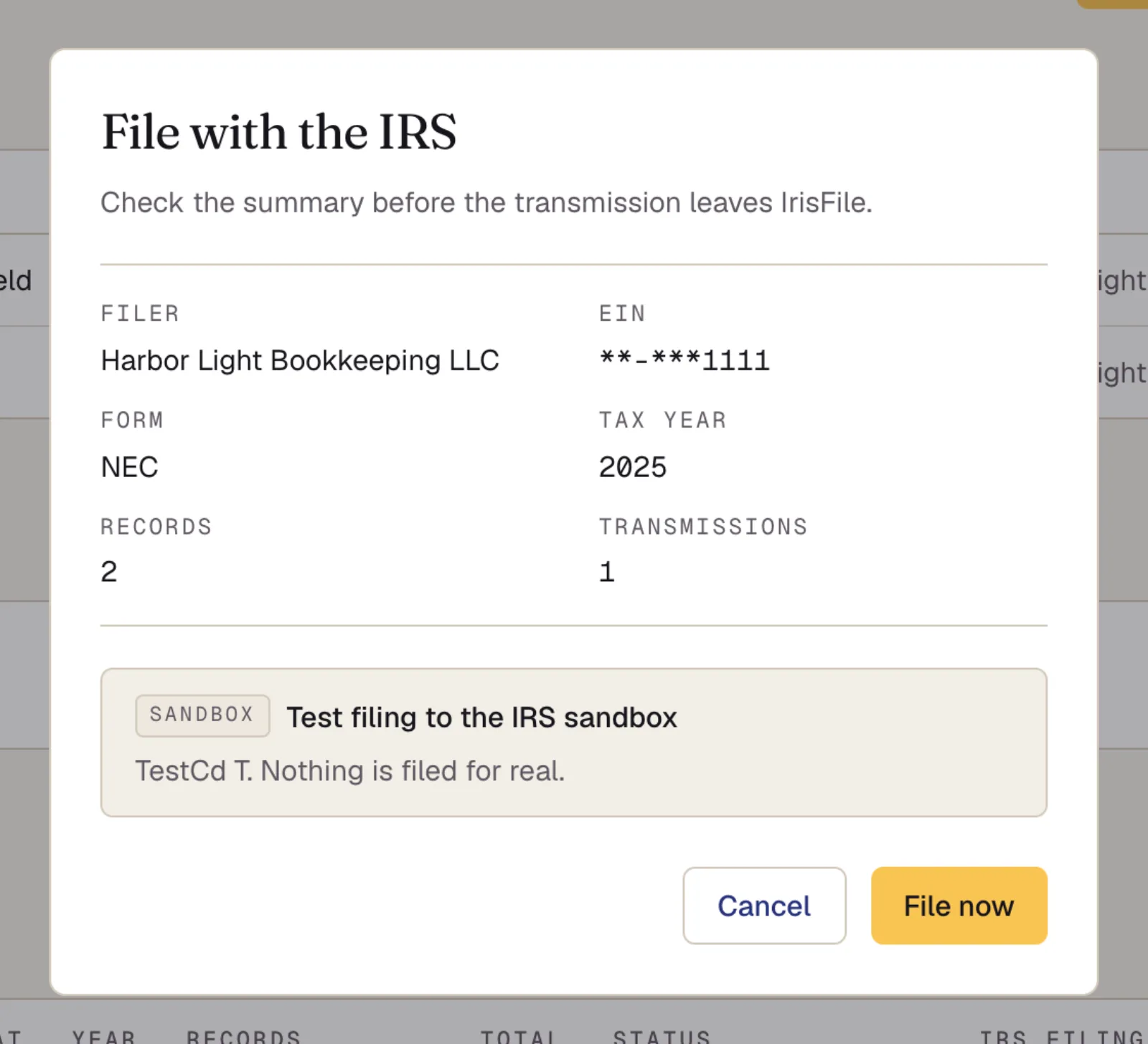
The summary to check before filing. This capture is from the sandbox. - 03
Keep the receipt ID
After you file, the row shows the IRS transmission receipts. Each transmission has a UTID and an IRS receipt ID. Keep the receipt ID: it identifies the transmission to the IRS.
The acknowledgement reads Pending until the IRS finishes processing. IRISfile checks the IRS for it about once an hour and updates the row.

The IRS receipt for the transmission, while the acknowledgement is pending. - 04
Read the acknowledgement
The IRS returns one of four codes: A (accepted), E (accepted with errors), P (partially accepted), or R (rejected).
For a rejected or partially accepted file, fix the records, convert the file again, and file the new version. A replacement within 60 days of a rejection keeps the original received date.
Questions
- Can I cancel a filing after I click File now?
- No. The transmission goes to the IRS when you click File now, and it can't be recalled. Check the summary first. IRISfile does not file corrections yet, so a filed return has to be corrected outside IRISfile.
- Does IRISfile file corrections and voids?
- Not yet. IRISfile files originals only. 1099-S and 1099-B are not filed yet either.
- Why is File with the IRS greyed out?
- A file that was rejected or partially accepted can't be filed again as it is. Fix the records, convert the file again, then file the new version. The button is also off while filing is turned off for the site.